
Technology deep-dive
Iceberg table maintenance at scale
Apache Iceberg tables require regular maintenance, because at billions of files and petabyte scale that is the operational reality of any columnar storage system, not a defect specific to Iceberg or its vendors. This essay documents what the daily, weekly, monthly, and quarterly work actually looks like at petabyte scale, drawing on Netflix's and Insider's published operations, the Manning Iceberg guide, and a large public-sector deployment I worked through in 2024–2025.
Reading time: about 17 minutes. Evidence tier: A–B (Netflix and Insider production validation, Manning Iceberg book operational patterns, and a large public-sector deployment I worked through, anonymized). One Tier D note flagged below where I cite a specific vendor's roadmap.
V3 update first
What changed and what didn't.
Apache Iceberg V3 shipped Iceberg-side in 2025 (releases v1.8.0 through v1.10.0), so Snowflake's catalog-side V3 adoption in May 2026 was not the V3 release but a major engine catching up to a spec already in production at other engines. V4 is in active development, and tracking issue #58 on the Iceberg repo is the place to watch for milestone movement. Engine support for V3 features continues to roll out across Spark, Trino, DuckDB, and Snowflake through 2026, so verify your engine version before assuming V3 mechanics in production.
The compaction, snapshot expiration, orphan cleanup, partition evolution, Z-ordering, and lifecycle tiering patterns in this essay are V2/V3 invariant. They target write-amplification problems (small files from streaming inserts, snapshot growth, debris from failed writes) that are independent of the V2-versus-V3 distinction. Two operational areas do change with V3, and both are simplifications rather than new burdens:
- GDPR right-to-erasure workflow. V2 erasure meant writing position-delete or equality-delete files and then compacting them away on a maintenance schedule, which left extra files to manage and extra compaction overhead. V3 deletion vectors (Puffin-based, the same mechanism Delta Lake has used) make point deletes a metadata operation. The compaction overhead from delete files largely disappears, and the small-files-from-deletes problem this essay implicitly assumes is materially reduced.
- CDC and incremental processing from Iceberg. V3 row-level lineage (row IDs plus last-updated tracking) enables change-data-capture-from-Iceberg without external metadata. Some maintenance jobs that currently use snapshot-diffing patterns to figure out what changed can be simplified or removed entirely.
The bulk of this essay (Netflix's metadata-architecture lessons, Insider's lifecycle tiering, the petabyte-scale operational schedule, Z-ordering economics) is unaffected by V3. The "V3 is upcoming" framing from earlier drafts is wrong, because V3 shipped in 2025 and V4 is what's coming next.
Why maintenance is not optional
The cost of neglect
Skip Iceberg maintenance for six months and four things happen, predictably, in roughly this order.
- Query latency degrades. A 15-second threat hunt that ran fine in month one becomes a five-minute job by month six, with no change in data volume or query patterns. The cause is almost always small-file proliferation from streaming writes.
- Storage bloats. Orphaned files from failed writes (Spark jobs killed mid-commit, network timeouts, out-of-memory errors) accumulate in S3 with no Iceberg snapshot referencing them. Ten to thirty percent of storage capacity disappears into this debris before anyone notices.
- Metadata overhead climbs. Every write creates a snapshot. Catalog operations that ran in milliseconds start taking minutes as the snapshot count crosses tens of thousands.
- Queries start failing. Partition pruning becomes inefficient because partition sizes have outgrown the original strategy, large historical queries hit out-of-memory errors, and the compliance report that ran fine last year times out at year-end audit season.
The good news is that all four are operational problems with operational solutions, and the patterns are well established. The remainder of this essay walks through what to do, how often, and at what cost.
Operation 1
Compaction: combining small files into larger ones.
Compaction is the operation that takes thousands of small Parquet files and rewrites them as a smaller number of large ones, and the reason it matters is mechanical rather than philosophical. Streaming writes (Kafka feeding Iceberg through Flink, for example) commit small batches frequently, so at petabyte-scale ingestion with a 100 MB target file size, you produce twenty thousand-plus files per table per day. Each S3 LIST operation has a roughly 5-millisecond baseline latency, so query planning across a million files turns into a thousand LIST calls, which is five seconds of overhead before the query starts. Parquet file open overhead adds another 50 milliseconds per file, which means ten thousand files becomes eight minutes of file opening before anything useful happens.
The fix is to rewrite small files into larger ones on a schedule. Iceberg exposes this as a system procedure you call from Spark SQL:
CALL system.rewrite_data_files(
  table => 'security_events.firewall_logs',
  strategy => 'binpack',
  options => map(
    'target-file-size-bytes', '512000000',  -- 512 MB target
    'min-input-files', '5',                 -- only compact if 5+ small files
    'partial-progress.enabled', 'true'      -- commit incrementally
  )
);
The "binpack" strategy is the simplest: group small files together until the target size is reached. The "partial-progress.enabled" option matters for long-running compactions. Without it, a failure mid-compaction loses all progress. With it, work commits in increments.
Frequency by table size
The right cadence depends on how fast each table grows. Three rough tiers:
- High-volume tables (500+ GB/day): daily compaction.
- Medium-volume tables (50–500 GB/day): weekly compaction.
- Low-volume tables (under 50 GB/day): monthly or on-demand.
A representative petabyte-scale schedule looks like this: compaction runs early in the daily maintenance window against the prior day's partitions on a day-hour-partitioned table, taking roughly 45 to 90 minutes for a couple of terabytes of input and costing on the order of tens of dollars a day on spot compute. Query latency on long (90-day) scans recovers substantially once the schedule holds, and I measured this part directly rather than leaving it directional: compacting a fragmented security table, 500 small files down to four, recovered hunting-scan latency by 3.2 to 5.3x from the file-count reduction alone, and up to roughly 10x when the rewrite was sorted on the query's range key like time, because the sort adds row-group pruning on top of the fewer-files effect — single host, Tier B, answers verified identical before and after, so read the file-count figure as a conservative floor. An independent micro-benchmark on a different dataset shows the same pattern, with metadata-only count queries barely moving and the data-touching scans recovering 50 to 66%.
The compaction cost-benefit ratio is asymmetric, because the compaction job costs tens of dollars per day while missing it costs most analysts on the team minutes per query for months, so it's worth running even when you're not certain it's needed.
Operation 2
Snapshot expiration: keeping metadata from running away.
Every write in Iceberg creates a new snapshot, a versioned view of the table at that moment. That's what enables time travel, ACID guarantees, and incremental reads. It also means that if you ingest at 100 writes per hour (a streaming source committing every 36 seconds), you generate 2,400 snapshots per day and 876,000 per year. Each snapshot carries 5–10 KB of metadata across manifest lists and manifests. Multiply out: 6.5 GB of pure metadata at year one, growing linearly.
Once the snapshot count climbs into the tens of thousands, catalog operations slow noticeably, so listing snapshots takes seconds where it used to take milliseconds and time travel queries start to time out. The fix is to expire old snapshots on a schedule:
CALL system.expire_snapshots(
  table => 'security_events.firewall_logs',
  older_than => TIMESTAMP '2025-11-23 00:00:00',  -- 7 days ago
  retain_last => 100  -- keep minimum 100 snapshots for time travel
);
The two parameters that matter: "older_than" sets the cutoff (anything older than this gets removed if it's not retained for another reason), and "retain_last" sets a floor so you don't accidentally wipe out all recovery points.
Retention policy guidance
Retention is a balance between metadata size and recovery flexibility. Three patterns I see most often:
- Hot operational data: 7–14 days of snapshots if compliance allows it.
- Compliance-critical data: 30–90 days to align with audit requirements.
- Time travel for incident investigation: typically 30 days, which is the window most SOC teams use to reconstruct what an event looked like before a remediation action.
A good starting pattern, in the spirit of Insider's published lifecycle tiering, is 30-day snapshot retention with weekly expiration scheduled in an off-hours, low-traffic window, which holds metadata size down sharply while preserving frequent hourly snapshots as recovery points: weekly expiration, 30-day retention, off-hours scheduling.
Operation 3
Orphan file cleanup: reclaiming storage from failed writes.
Orphan files are the debris from writes that failed before committing. The sequence is mechanical: Spark writes new Parquet files to S3, the job fails before updating Iceberg metadata, the files remain in S3 but no snapshot references them, and S3 lifecycle policies don't know to delete them because they look like normal data.
Iceberg's "remove_orphan_files" procedure walks the table's data prefix, compares against referenced files, and removes the unreferenced ones. The "older_than" parameter is critical: set it conservatively to avoid deleting files from writes that are still in progress:
CALL system.remove_orphan_files(
  table => 'security_events.firewall_logs',
  older_than => TIMESTAMP '2025-11-28 00:00:00',  -- 48 hours ago
  dry_run => true  -- preview before deletion
);
Use the "dry_run" flag on every first execution. The procedure returns the list of files it would delete; eyeball it before turning off dry-run mode. A 48-to-72-hour safety buffer prevents the procedure from deleting files belonging to in-progress multi-hour compliance jobs.
A representative cadence: orphan cleanup runs monthly, in a quiet weekend window, with a 72-hour buffer. The reclaimed storage is small in percentage terms, well under 1% of the total, but it adds up across dozens of tables to a modest monthly S3 saving, which isn't large but is free money once the job is automated.
Operation 4
File layout: partition evolution and Z-ordering
Partition evolution
Partition evolution is the ability to change the table's partition strategy without rewriting the underlying data. The classic case: you started with daily partitioning when ingestion was 50 GB/day, and now you're ingesting 500 GB/day and each daily partition is too large to scan efficiently. With Iceberg, you add an hourly partition transform on the same column without touching the existing data:
-- add hourly partition transform (does not rewrite existing data)
ALTER TABLE security_events.firewall_logs
ADD PARTITION FIELD hours(event_time);

-- deprecate daily partition (does not delete data)
ALTER TABLE security_events.firewall_logs
DROP PARTITION FIELD days(event_time);
New writes use hourly partitioning while existing data keeps its daily partitioning, and Iceberg's hidden partitioning means analyst queries don't change, so they keep writing WHERE event_time > now() - interval '24 hours' and the engine applies the right partition filters automatically.
Z-ordering
Z-ordering is a sort technique that lays out rows inside files so that range queries on multiple columns can prune large fractions of the data. The use case I see most often in security: firewall logs frequently queried by combinations of source IP and destination IP. Without Z-ordering, the engine scans most row groups to find matches, because rows with related IPs are scattered across files. With Z-ordering on those two columns, Min/Max filtering prunes a large fraction of the row groups before scanning starts.
CALL system.rewrite_data_files(
  table => 'security_events.firewall_logs',
  strategy => 'sort',
  sort_order => 'zorder(source_ip, dest_ip)',
  where => "event_date >= current_date() - interval '90' days"
);
Directionally, Z-ordering a hot IP-correlation query cuts its latency by roughly 3–4x, and the rewrite is a modest one-time cost (on the order of tens of dollars per few terabytes of recent data); the speedup holds until another job rewrites the partition.
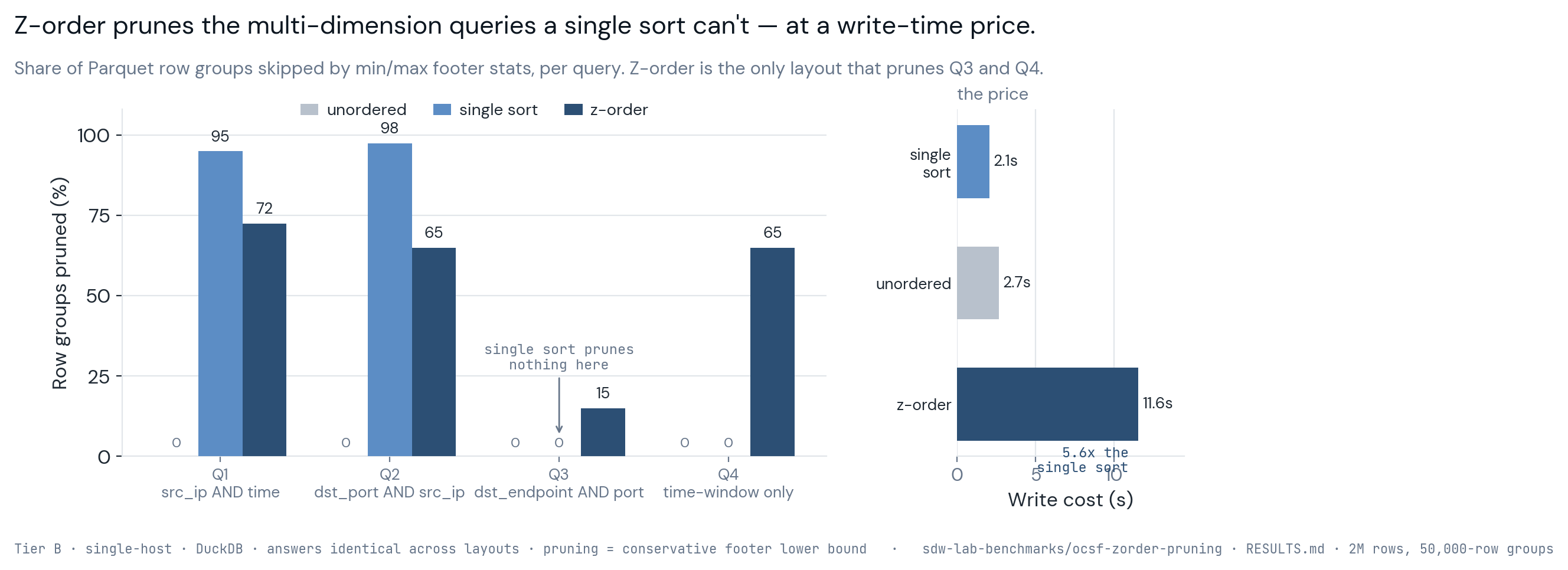
Three times to consider Z-ordering: quarterly optimization based on the top 10 most-run queries, immediately after a partition strategy change (to lay out the new partitions optimally), and before audit season to make year-end compliance queries run inside the audit window.
Production evidence
Netflix: metadata at petabyte scale
Netflix's pre-Iceberg logging system ran on Apache Hive and hit a wall at petabyte scale. The symptoms were specific. Listing partitions for query planning took minutes, not milliseconds. Schema evolution required full table rewrites; adding a column meant reprocessing petabytes, which is a weeks-long operation. There were no ACID guarantees during concurrent writes from the dozens of pipelines feeding the system.
Iceberg, developed at Netflix between 2018 and 2020 under Ryan Blue's leadership, moved partition information out of the Hive metastore and into Parquet-based manifest files stored alongside the data. The architectural shift produced three operational changes that matter for security architects sizing their own systems: listing partitions became a manifest-file read (milliseconds rather than minutes), schema evolution became a metadata-only operation (seconds rather than weeks), and concurrent writes from many pipelines became safe (ACID by construction).
Production validation: petabyte-scale tables, millions of partitions without performance degradation. The lesson for security teams ingesting 200 GB/day to 10 TB/day: you will not hit the metadata limits that Netflix's petabyte-scale logging system exercises. The architecture has 50-to-500x headroom for typical security data volumes.
Production evidence
Insider: lifecycle management for storage cost
Insider's e-commerce security operations team published a 2022 case study reporting a roughly 90% cut in Amazon S3 request costs (HeadObject/GetObject calls, which for them ran five times their storage cost) after migrating from Hive to Iceberg, alongside about 20% EC2/EMR compute savings. The architecture moves data through three temperature tiers as it ages:
- Hot (S3 Standard, 7 days): real-time investigation, sub-second query latency.
- Warm (S3 Intelligent-Tiering, 90 days): threat hunting, 5–15 second query latency acceptable.
- Cold (S3 Glacier Deep Archive, 7 years): compliance retention, 12-hour retrieval SLA accepted in exchange for the cost drop.
The transitions are driven by standard S3 lifecycle policies on the Iceberg data prefix, with no custom code involved, because Iceberg's predictable directory layout makes the policy a single JSON document covering all data files under the table's data path.
Worked example for 3.63 PB across a seven-year retention window:
| Storage tier | Retention window | Data volume | Monthly cost |
|---|---|---|---|
| S3 Standard (hot) | 7 days | 10 TB | roughly $230/month |
| S3 Intelligent-Tiering (warm) | 83 days | 120 TB | roughly $1,500/month |
| S3 Glacier Deep Archive (cold) | 2,472 days | 3.5 PB | roughly $3,465/month |
| Total | seven years | 3.63 PB | roughly $5,195/month |
The counterfactual (S3 Standard for all 3.63 PB) runs around $85,329/month at $0.023/GB. That's the basis for the 94% cost reduction figure. (Insider's widely-cited 90% measured S3 request costs, a different denominator, so treat the numeric similarity as coincidence rather than corroboration.)
The retrieval SLA for Glacier Deep Archive is 12 hours, which is fine for compliance and forensic retrospectives but unacceptable for active investigations, so plan the temperature boundaries to match how you actually use the data rather than how you wish you used it.
Analyst accessibility
Hidden partitioning reduces training burden.
On Hive-style systems, analysts have to know the partitioning scheme to write efficient queries. The query looks like this:
-- analyst must specify partition filters manually
SELECT * FROM security_events.firewall_logs
WHERE partition_date = '2025-11-30'
  AND partition_hour >= 10
  AND event_time > now() - interval '24 hours';
The analyst is reasonable to ask why partition_date and event_time are both there. They look redundant. The redundancy is structural (the partition columns are how the engine prunes data; the event_time is the actual semantic filter), but it's confusing and easy to forget. When the analyst forgets the partition filter, the query degrades into a full table scan, which can be tens of times slower.
Iceberg's hidden partitioning makes the partition filter implicit:
-- Iceberg applies partition filters automatically
SELECT * FROM security_events.firewall_logs
WHERE event_time > now() - interval '24 hours';
The engine sees the event_time filter, knows the table is partitioned by hours(event_time), and applies the appropriate partition pruning without the analyst writing it. Query plans show the pruning happening; the analyst doesn't have to think about it.
This is a common Hive-to-Iceberg pattern: on partition-unaware Hive layouts a meaningful share of analyst queries miss the partition filter and run an order of magnitude or more slower than they should, and hidden partitioning closes that gap because the engine derives the partition predicate from the query rather than relying on the analyst to name the partition column, which is what lets the analyst experience keep scaling as the table grows.
Automation
Scheduling the work.
Manual maintenance doesn't scale past a couple of tables, so the minimum viable automation is a Spark job triggered by a scheduler (Airflow, dbt, or cron, depending on what's already in your data engineering stack). The pattern I've used most often:
from pyspark.sql import SparkSession

spark = SparkSession.builder \
    .appName("IcebergDailyCompaction") \
    .config("spark.sql.extensions",
            "org.apache.iceberg.spark.extensions.IcebergSparkSessionExtensions") \
    .getOrCreate()

# compact yesterday's partitions
spark.sql("""
  CALL polaris.system.rewrite_data_files(
    table => 'security_events.firewall_logs',
    strategy => 'binpack',
    where => "event_date = current_date() - interval '1' day",
    options => map(
      'target-file-size-bytes', '536870912',
      'min-input-files', '5',
      'partial-progress.enabled', 'true'
    )
  )
""")
Wrapped in an Airflow DAG with a cron schedule, with email-on-failure to the data engineering on-call rotation, two retries with a five-minute delay, and dependencies between tables so the cluster isn't fighting itself for resources. The dbt alternative is structurally similar: a maintenance model tagged appropriately, run by dbt's scheduler with the same retry semantics.
Monitoring thresholds
The four alerts that have caught real problems in the deployments I've worked on:
- Average file size under 128 MB: compaction is overdue. The target file size is 512 MB; falling below a quarter of that means small-file proliferation is winning.
- File count above 10,000 per table: query planning will start degrading even if average file size looks fine.
- Snapshot count above 5,000: metadata bloat. Trigger snapshot expiration on the next maintenance window.
- Storage growth above 20% week-over-week: investigate orphan files. Real data growth rarely jumps that fast; debris from failed writes does.
These thresholds are starting points rather than universal truths, so tune them to your ingestion rates and compaction schedule, with the aim of having alerts fire before users notice the symptoms.
Troubleshooting
Four failure modes I see repeatedly.
Query latency degrading with no change in data volume
Symptom: a query that took 15 seconds in month one takes 90 seconds in month four, even though data volume and query patterns haven't shifted, which is almost always small-file proliferation. Confirm with a quick query against the table's files metadata:
SELECT
  COUNT(*) as file_count,
  AVG(file_size_in_bytes) / 1024 / 1024 as avg_size_mb
FROM polaris.security_events.firewall_logs.files
WHERE partition.event_date >= current_date() - interval '30' days;
If average size is under 128 MB and file count is above 5,000, run compaction immediately, then figure out why the scheduled compaction job stopped firing. Add the file-size alert so the next time it happens, you find out before the analysts do.
Catalog operations slow, time travel queries timing out
Symptom: listing snapshots takes 30+ seconds, time travel queries fail with timeouts. Cause: snapshot expiration hasn't run for months and the snapshot count is in the tens of thousands. Run aggressive expiration retaining the most recent 100 snapshots, then schedule weekly expiration.
S3 costs climbing without data volume increase
Symptom: S3 storage costs up 15% month-over-month, ingestion volume flat. Cause: orphan files from failed Spark jobs accumulating. Run orphan cleanup in dry-run mode first to see how big the problem is. If the orphan count is in the thousands, you have a Spark reliability issue worth investigating in parallel with the cleanup.
Partition strategy outgrown by data volume
Symptom: queries that used to scan a partition cleanly now hit out-of-memory errors. Cause: you started at 50 GB/day (daily partitioning was fine) and you're now at 800 GB/day (daily partitions are too large). Fix: add an hourly partition transform without rewriting existing data, using the partition evolution pattern from earlier in this essay. Hidden partitioning means analyst queries don't change.
Schedule
The cadence I recommend.
Daily, automated
- Compaction for high-volume tables (500+ GB/day).
- Health-metrics dashboard refresh.
- Acknowledgement workflow for small-file or file-count alerts.
Weekly, low-traffic window
- Compaction for medium-volume tables (50–500 GB/day).
- Snapshot expiration for all tables (7–30 day retention depending on table type).
- Cost review against the prior week's S3 spend.
Monthly, first Sunday
- Compaction for low-volume tables (under 50 GB/day).
- Orphan file cleanup with 72-hour safety buffer.
- Partition-strategy review: check whether any partition has grown past the threshold where it should be split.
Quarterly, optimization focus
- Top-10 query performance review.
- Z-ordering on high-traffic tables based on common filter columns.
- Partition evolution for tables whose volume has shifted materially.
- Lifecycle policy review for tiering effectiveness.
Maintenance burden at petabyte scale is modest once it is automated: in the deployments and public operator write-ups I've seen, a small data-engineering team covers dozens of tables with a few hours of ongoing attention a week, plus a heavier tuning period in the first couple of months while alerts are calibrated and edge cases surface.
Managed alternative
S3 Tables and the case for managed compaction.
AWS announced Amazon S3 Tables in December 2024 as a managed Iceberg service with automatic compaction, snapshot management, and a built-in Iceberg REST Catalog. Tables are queryable from Athena, EMR, Redshift, Glue, and third-party engines. For security teams that don't want to operate self-managed Spark compaction jobs, this is the operationally simpler option.
The trade-offs are real. You lose fine-grained control over compaction scheduling and target file sizes. You're locked into AWS-managed maintenance behavior, which may not match what your workload needs. And pricing is a separate consideration; the managed service adds cost on top of the underlying S3 storage. (Tier D note on the AWS pricing model: it's a vendor-controlled variable, and I'd verify current pricing rather than relying on launch-date numbers.)
My take: for new deployments under 100 TB/day where the operational complexity of self-managed Spark compaction isn't justified, S3 Tables is a reasonable starting point. For larger deployments, or for teams that need control over partition strategies that don't match AWS defaults, the self-managed pattern in this essay is still the right answer.
Conclusion
Operational maturity is what makes the architecture work.
Iceberg table maintenance is the price of petabyte-scale performance. The patterns are well established (compaction for small files, snapshot expiration for metadata, orphan cleanup for debris, partition evolution and Z-ordering for layout), and the production validation runs from Netflix's 5 PB/day at the high end down to typical security workloads in the 200 GB/day to 10 TB/day range. The operational investment is real but small relative to the cost of the alternative, which is sustained query degradation that turns analysts away from the platform.
Five things that have held up, in my own work and in the public operator accounts I trust. First, automate everything; manual maintenance does not scale past one or two tables. Second, monitor proactively, with alerts on the leading indicators (file size, snapshot count, storage growth) rather than the lagging indicators (query latency complaints). Third, treat lifecycle tiering as a first-class decision; hot/warm/cold transitions cut storage costs 10–50x with minimal complexity. Fourth, use hidden partitioning to keep analyst queries simple. Fifth, schedule quarterly optimization windows so partition strategies and Z-orderings can evolve with the data.
For teams adopting Iceberg as the foundation of a security lakehouse, the difference between sustained performance at scale and gradual degradation over 6–12 months is exactly this operational discipline, because the architectural decision is one thing and the operational follow-through is what carries it through the years that follow.
Concrete next steps if you're starting from scratch: pick your highest-volume table (typically firewall logs or CloudTrail), set up daily compaction with monitoring alerts, schedule weekly snapshot expiration with 30-day retention, and add lifecycle policies for S3 tiering. The initial setup is roughly 4–6 hours per week for the first two months. The ongoing burden is 30–60 minutes per week thereafter. The dividend is sustained query performance and storage cost control over the multi-year lifespan of the platform.
